
Create Beautiful Pinterest Pins in Seconds from Your Blog Posts, URLs, Titles or Keywords
Generate multiple pin designs, automatically extract images from your content, add your branding and export Pinterest-ready pins in bulk.
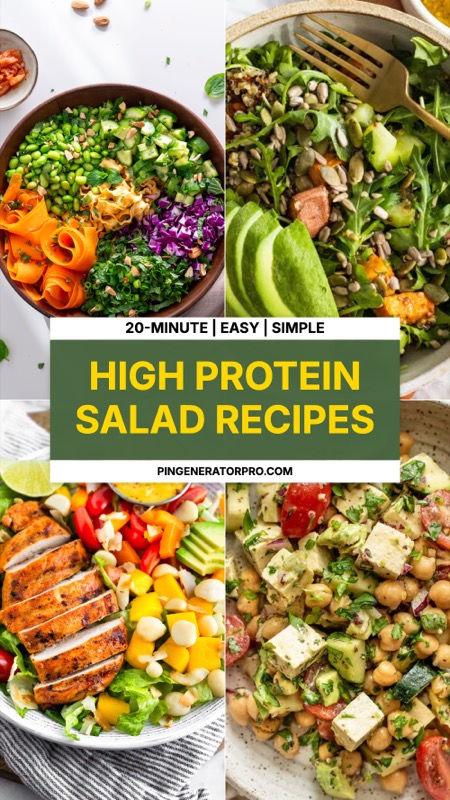


Make Pinterest Pins Without Designing From Scratch
Creating Pinterest pins for every blog post shouldn't mean opening Canva and starting over every time.
Pin Generator Pro lets you turn your existing content into polished Pinterest graphics using professionally designed templates. Choose a layout, customize your content and generate multiple variations in minutes.
Whether you're a blogger, affiliate marketer, content creator or Pinterest manager, you can create more pins without spending hours designing them.
Features
Everything You Need to Create Better Pinterest Pins
Pinterest Pin Templates
Start with professionally designed Pinterest pin templates instead of a blank canvas. Choose from layouts built for recipes, travel guides, listicles, blog posts, products and more.
Bulk Pinterest Pin Generator
Create multiple Pinterest pin variations at once. Generate different designs from your article titles, headlines or keyword lists without creating each pin manually.
Turn Blog Posts Into Pins
Paste a blog post URL and let Pin Generator Pro extract the content and images you need. Turn an existing article into Pinterest-ready graphics without copying everything manually.
Automatic Image Extraction
Pull high-resolution images directly from your blog posts and use them as pin backgrounds. No need to download and upload every image yourself.
Stock Image Search
Find images for your pins without leaving your workflow. Search stock photography and add images directly to your designs.
Batch Export
Generate your pins and download them together as a ZIP file. Export high-resolution 1000 × 1500px PNGs ready to upload or schedule.
3 Simple Steps
How to Use the Pinterest Pin Generator
Go from an idea or blog post to finished Pinterest pins in three simple steps.
Add Your Content
Enter your pin headline, subheading or keywords. You can also paste a blog post URL to automatically extract titles and images.
Choose a Pin Template
Pick a Pinterest pin layout that fits your content. Customize the text, images, fonts, colors and branding.
Generate & Export
Create your Pinterest pins and export them as high-resolution PNG files. Generate multiple variations when you want more content from the same article.
Pinterest Pin Templates
Pinterest Pin Templates for Every Type of Content
Your content shouldn't all look the same. Choose from Pinterest pin templates designed for different niches and content formats.
Food & Recipes
Create recipe pins that put your dish and headline front and center.
Travel
Turn destinations, itineraries and travel guides into scroll-stopping Pinterest graphics.
Home & Decor
Create visual pins for decorating ideas, room inspiration and DIY content.
Beauty & Fashion
Build polished pins for beauty guides, outfits, products and trends.
Blog Posts
Turn listicles, tutorials, guides and other articles into multiple Pinterest graphics.
Lifestyle
Create flexible Pinterest designs for everyday content, ideas, tips and inspiration.
Quotes & Typography
Create viral quote pins designed for high re-pins, shares, and audience engagement.
Products & E-Commerce
Promote your e-commerce products, Etsy items, and shop merchandise.
Designed for Growth
Built for Bloggers, Creators & Pinterest Marketers
Pin Generator Pro is designed for people who need to create Pinterest content consistently, not just design one pin.
For Bloggers
Turn every article into multiple Pinterest pin variations and keep your old content working for you.
For Affiliate Marketers
Create product-focused Pinterest graphics without designing every variation manually.
For Content Creators
Generate branded pins quickly so you can spend more time creating content and less time designing graphics.
For Pinterest Managers
Create and export large batches of Pinterest pins for multiple pieces of content.
From One Blog Post to Multiple Pinterest Pins
You already have the content. Pin Generator Pro helps you turn it into more Pinterest-ready assets.
Instead of designing every pin individually, create a batch of variations from the content you already have.
Simple Pricing
Simple Pricing for Every Creator
Start free and upgrade when you need more.
Free
For trying Pin Generator Pro and creating your first Pinterest pins.
- 3 pins per day
- Basic Pin Studio
- 5 starter templates
- Blog URL import
- Upload your own images
- Stock image search
- PNG downloads
- Basic typography
- Basic color presets
Pro
For bloggers, creators and Pinterest marketers who need to create pins consistently.
- Unlimited pin generation
- Unlimited templates
- Save custom templates
- Premium fonts
- Bulk pin generation
- Automatic blog image extraction
- AI stock image search
- Pinterest account connectionComing Soon
- Batch export
- Priority support
Frequently Asked Questions
Frequently Asked Questions
What is a Pinterest pin generator?
A Pinterest pin generator is a tool that helps you create Pinterest graphics without designing every pin manually. Pin Generator Pro lets you create pins from blog posts, URLs, titles or keywords using customizable templates.
What size are Pinterest pins?
Pin Generator Pro exports Pinterest pins at 1000 × 1500 pixels, a 2:3 vertical format designed for Pinterest.
Can I create multiple Pinterest pins at once?
Yes. The bulk pin generator lets you create multiple pin variations from your content instead of designing each pin individually.
Can I create Pinterest pins from a blog post?
Yes. Paste your blog post URL and Pin Generator Pro can extract relevant titles and images that you can use to create your pins.
Can I use my own images and branding?
Yes. You can upload your own images and customize your pins with your logo, fonts, colors and other brand elements.
Is Pin Generator Pro free?
Yes. The Free plan lets you create up to 3 pins per day with access to starter templates and core pin creation features.
Create Your Next Pinterest Pins in Seconds
Stop designing every Pinterest pin from scratch.
Turn your existing content into beautiful, branded Pinterest graphics and generate multiple variations in minutes.